
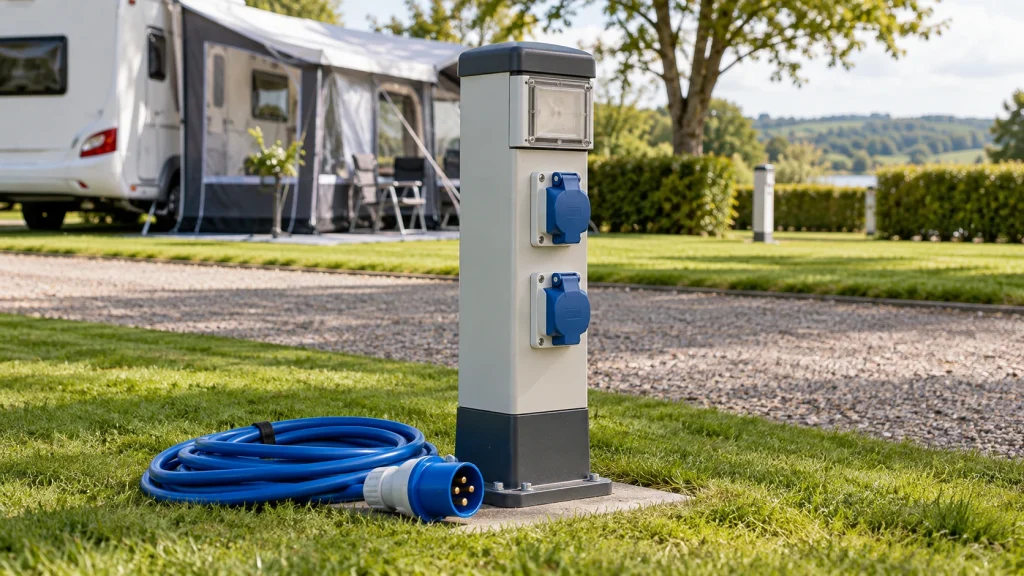
You have parked, found your pitch, and located the power post. Before unrolling the cable, take a minute to check what you are connecting to. A campsite power post may be shared, weather-exposed, or operated through a payment system, and the nearest socket is not necessarily the one assigned to your pitch. A short check helps you spot damage, choose the right connection and avoid trouble once your equipment is running.
Confirm the post belongs to your pitch
Start with your booking details and any instructions given at arrival. Check the pitch number, post label, and socket assignment if they are marked. Some sites use one post for several pitches, so proximity alone is a poor guide. If the allocation is unclear, ask campsite staff before connecting.
Look for instructions on how electricity is activated and charged. It may be included in the pitch arrangement, billed separately, or controlled at the post. For example, at Hamre Familiecamping, electricity is paid directly through the PowerPay system, based on the camper’s own consumption. Knowing the arrangement before you plug in helps you avoid activating the wrong outlet or assuming that power will start automatically.
If you arrive when reception is closed, use the instructions provided with your booking. Where those instructions do not identify a post or explain activation, wait until you can confirm the correct connection rather than trying available sockets.
Inspect the post without opening it
You do not need to dismantle anything to make a useful visual check. Look at the outside of the post, the socket, and the area around them. A sound-looking enclosure should be closed and stable, with no exposed wires or obvious damage.
Pause and seek help from campsite staff if you notice:
- A broken cover, loose socket, or damaged casing.
- Scorch marks, a burning smell, or signs of overheating.
- Water inside the socket or a post standing in pooled water.
- Exposed wiring, a missing protective flap or a connection that appears to have been altered.
Rain on an outdoor post does not by itself tell you that something is wrong. Water where the plug makes contact is a different matter. Avoid touching damaged parts, opening the enclosure, or attempting a repair. Staff can arrange for the post to be checked or direct you to another approved connection.
Also look at where your cable will run. A post may be in good condition while the route back to your vehicle crosses a lane, a puddle, or a place where people regularly walk. Positioning the vehicle and cable thoughtfully can prevent a trip hazard and reduce the chance of the lead being crushed.
Check your cable and plug
Use a campsite connection lead suitable for your equipment and the socket provided. Before connecting, inspect the full length you can see, including both plugs. Look for cuts, flattened sections, cracked housings, loose parts or signs that a plug has become hot. Keep the plug contacts clean and dry. If the lead is damaged, replace it rather than wrapping it with tape and using it for the stay.
A plug should fit the socket as intended, without being forced. Avoid stacking adapters or using an indoor extension lead outdoors. If your plug does not match, ask the campsite what connection is required and use suitable equipment.
Lay out the lead so you can see its route. Fully unwind a cable reel before use, and avoid leaving spare cable tightly coiled. Keep connections off the ground where practical, especially where rainwater might collect. Do not run a lead through a closed door or window if doing so pinches it.
Make the connection in a sensible order
Follow the instructions for your vehicle, tent equipment and campsite post. As a general approach, make sure appliances are switched off before connecting, and connect the lead to your equipment before plugging it into the post. If the post has an accessible switch or activation control, follow its instructions rather than assuming the socket is live.
Once power is available, check that the connection is secure and your equipment behaves normally. Your vehicle or camping unit may have its own protective device that trips if there is a fault or too much demand. If power trips, switch off appliances and follow the equipment instructions. A kettle, heater and other high-demand items running together can exceed the available supply, depending on the pitch and your equipment.
Do not repeatedly reset a device that trips without understanding why. If the post is making unusual noises, smells hot, shows damage, or trips again with appliances off, stop using it and tell staff. The same applies if a plug feels loose or becomes unusually warm. Electrical faults are not something to investigate by opening the post yourself.
For more detailed information on this topic, read our guide on Cabin Accommodation or Tent Camping: Which Requires Less Preparation.
Check again during your stay
A quick look after setup and during the stay can catch problems caused by changing weather or movement around the pitch. Make sure the protective flap remains in place where fitted, the lead has not shifted into a walkway, and nobody has parked over it. Keep the connection accessible so you can disconnect it when needed.
When leaving, switch off appliances and follow the equipment and post instructions for disconnecting. Remove the plug by its body, not by pulling the cable, then check that you have collected the whole lead. If the post uses a payment system, follow its directions for ending your session.
Checking a campsite power post is mostly a matter of confirming the right outlet, spotting visible damage, and using a sound lead with a safe route. If any part of the setup is uncertain, ask campsite staff before connecting. That small pause is easier than dealing with a failed connection after camp is set up.